Computer vision — turn what your cameras see into business data
Computer vision is the branch of artificial intelligence that reads cameras and images automatically: it detects objects, identifies people, spots defects, reads text off documents and pushes the result straight into your systems. At Innosoft, computer vision projects start at 15,000,000 UZS and a typical system goes live in 30–60 days.
Updated: July 2026
What is computer vision?
Computer vision is the field of artificial intelligence that lets software interpret camera feeds and images. The system analyses a frame pixel by pixel, identifies the object, person, text or event inside it, and acts on that: it logs a record, raises an alert, or passes the data to another application. In short, a program does the watching a human eye used to do.
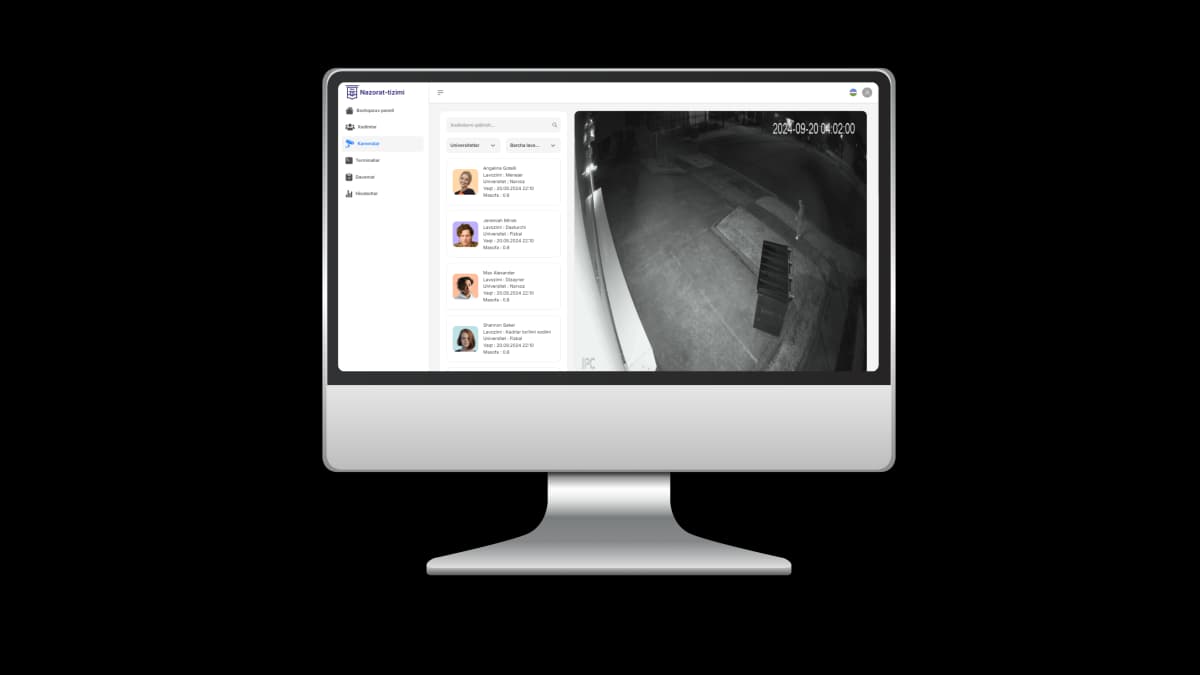
The difference is easiest to see with an example. An ordinary CCTV camera records video that somebody has to review later. A computer vision system reads the same stream in real time and surfaces only what matters: “a person entered a restricted zone”, “a defective item on the conveyor”, “412 people walked into the store today”. The archive becomes a report.
Computer vision is one branch of applied AI development. If your problem lives in text and conversation rather than pixels, that is a different discipline — see our AI agent development page. Computer vision works specifically with images and video.
Where computer vision is actually used
Six application areas cover almost every real request we receive: face recognition, object and event detection, visual quality control in manufacturing, people and product counting in retail, security video analytics, and document OCR. The table below shows what each one does, who it is for, and how complex it is to build.
| Use case | What it does | Who it’s for | Complexity |
|---|---|---|---|
| Face recognition | Matches a face in the frame against profiles in your database and identifies the person | Factories, offices, training centres, restricted facilities | Medium — proven models, but camera placement and lighting must be right |
| Object & event detection | Finds whether a given object is present (person, vehicle, box, hard hat) and what is happening in the scene | Warehouses, construction sites, logistics, car parks | Low to medium — pre-trained models cover common classes |
| Quality control (manufacturing) | Inspects every item on the line frame by frame and flags defects or wrong dimensions | Production plants, food processing, packaging | High — almost always needs a custom model trained on your defects |
| People & product counting (retail) | Counts visitors in and out and shows which zones people linger in | Shops, malls, restaurants, exhibitions | Low — a top-down camera at the entrance is usually enough |
| Security video analytics | Raises a real-time alert whenever a defined rule is broken (zone, time, movement) | Plants, warehouses, banks, public facilities | Medium — the hard part is tuning rules so alerts stay meaningful |
| Documents & OCR | Reads text from a photo or scan, extracts the fields and writes them to your database | Accounting, banking, insurance, logistics | Low to medium — no cameras needed, but form layouts must be mapped |
Several of these often run in one project — face recognition at the entrance and perimeter security analytics can share a single server.
What each use case looks like in practice
Concretely, here is what we can deliver in each of the six areas above.
Face recognition
A face is isolated from the frame, converted into a mathematical template and compared against templates already in the database. Unlike a card or a PIN, it cannot be handed to a colleague — the system identifies the person, not a token. Used for access control, identification and attendance.
Object detection
The model locates objects in a frame and marks each one with a bounding box: people, vehicles, boxes, tools, protective equipment. Every class can carry its own rule — for instance, “alert if someone enters without a hard hat”.
Quality control on the line
A camera above the conveyor inspects each item: shape, colour, label, packaging integrity. When a defect is found the line operator gets an alert, or the item is diverted automatically. This use case almost always requires a model trained on your own product.
People counting & retail analytics
A camera at the door counts visitors while cameras inside show which shelves people stop at. The owner finally gets a number for the question every retailer asks: how many walked in, and how many bought.
Security video analytics
Rules run continuously across the camera feeds: entry into a restricted zone, movement outside working hours, an object left unattended too long. When a rule fires, the security officer is notified instantly on Telegram or the dashboard — nobody scrubs through the archive by hand.
Document recognition & OCR
A photo of a passport, contract, invoice or waybill is read and the fields that matter — number, date, amount — are extracted. The data lands directly in your accounting system or CRM, and the manual re-typing disappears.
How computer vision actually works
The pipeline has four stages: the camera delivers a frame, preprocessing prepares it, the model analyses it, business rules decide whether anything happened, and the result is delivered into your systems. The whole chain repeats several times a second.
Camera → frame
The IP camera pushes frames to the server over RTSP. Depending on the task we analyse a few frames per second rather than every single one, then crop, resize and normalise the image — preprocessing that cuts server load dramatically.
Model → detection
A neural network processes the frame and returns each detection with a confidence score — “this is a person, confidence 0.93”. The model may be pre-trained or trained specifically on your data.
Rules → decision
Business rules are applied on top of the model output: is confidence above threshold, which zone is the object in, is this within working hours. Only what passes this filter is recorded as an event — this is where false alarms get eliminated.
Integration → result
The event is written to the dashboard, pushed via API into your CRM, 1C or warehouse system, and — where useful — sent to a Telegram bot. The result is not a standalone tool but a step inside your process.
Why “model training” is priced as separate work
For people, vehicles and text, strong pre-trained models already exist — configuring them is fast and cheap. But no off-the-shelf model can answer “is this specific part from this specific plant defective”. That model can only be trained on frames from your own facility. Which is why the price and timeline of a project hinge largely on this one question.
- Pre-trained is enough: people, vehicles, QR and barcodes, text (OCR)
- Custom model needed: defect types, bespoke parts, unusual equipment
- A custom model needs a real frame dataset — we collect it together
- After every training run, accuracy is measured on a held-out test set
The image-processing layer of our pipeline is built on OpenCV, the open-source library that has been the industry standard for computer vision since 2000.
Computer vision pricing
We offer three packages: Standard at 15,000,000 UZS, Premium at 30,000,000 UZS and Premium+ at 50,000,000 UZS. These cover the software, the model and the integration work — cameras and server hardware are quoted separately once we have seen your site.
Updated: July 2026
| Package | What’s included | Price (UZS) | Timeline |
|---|---|---|---|
| Standard | Image recognition, object detection, QR and barcode reading, basic image analysis, web interface, API integration, standard reporting, 3 months of technical support | 15,000,000 | 30–45 days |
| Premium most chosen | Everything in Standard plus face recognition, video analysis, activity detection, custom model training, integration with your existing systems, admin panel, extended reporting and analytics, 6 months of technical support | 30,000,000 | 45–60 days |
| Premium+ | Everything in Premium plus deep learning models, real-time multi-stream analysis, enterprise system integration, custom API, hardened security, high-load server architecture, 12 months of technical support | 50,000,000 | 60+ days |
What moves the price
- Whether a pre-trained model is enough or a custom model must be trained
- How many cameras and how many streams are analysed at once
- Whether results are needed in real time or a periodic report is enough
- Number of integrations: CRM, 1C, warehouse system, Telegram bot
- On-premise deployment versus cloud
- Number of sites and whether one shared dashboard is required
What the price does not include
The figures above cover software, model and integration. Quoted separately:
- Cameras and installation work (nothing to pay if your cameras suffice)
- Server or GPU workstation for real-time workloads
- Network infrastructure: switches, cabling, PoE power
- Support after the included period ends
In the free consultation we put together a written estimate for your site, hardware list included. Every service price is listed on our pricing page.
A real project — face recognition running in production
Computer vision is not theory for us. The system below is live at a corporate client and identifies employees by face at the entrance.
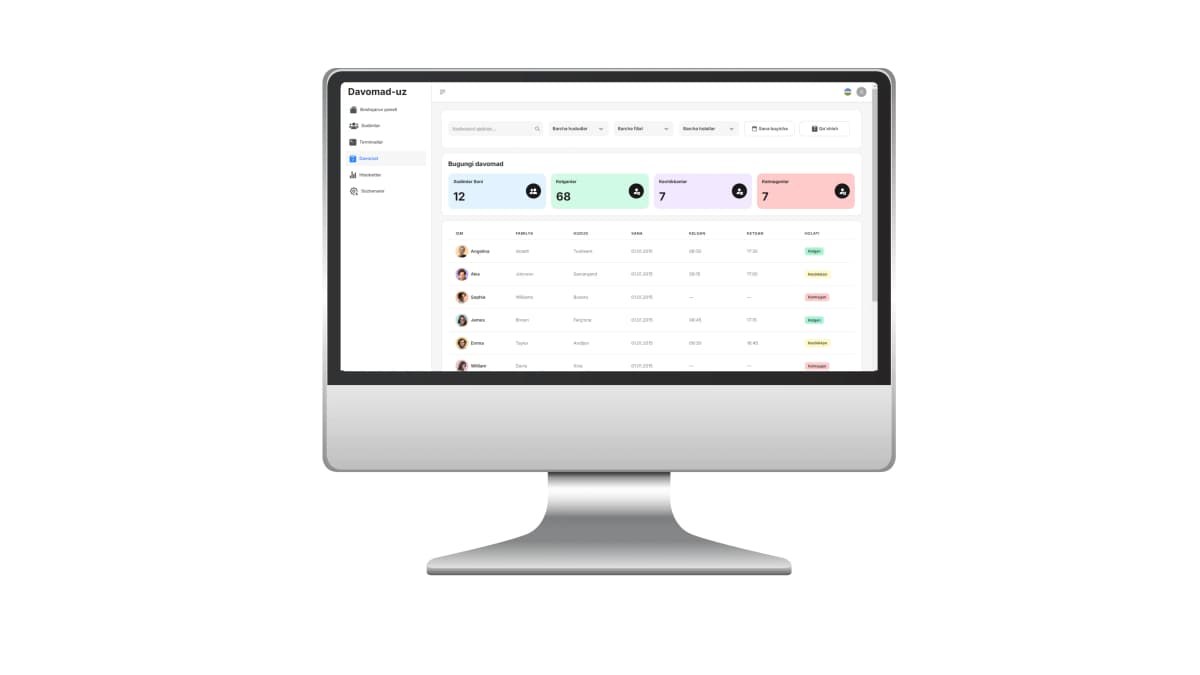
Attendance tracking through cameras and terminals
The task
Record arrivals and departures at a large enterprise automatically instead of by hand, and give management reporting it can trust.
The computer vision part
AI-based facial recognition cameras identify each employee automatically at the entry point. Dedicated terminals are installed at the entrances and monitoring runs in real time.
Technologies
Python, OpenCV, React, PostgreSQL and Docker — the model, the image-processing pipeline, the management panel and the deployment infrastructure, all in one project.
The result
Management tracks work hours, tardiness and early departures through detailed reports. Project duration: 3 months, delivered in 2024.
Is employee attendance exactly what you need?
Then there is no need to commission a computer vision project from scratch — we already have a finished product for it. Its packages, hardware, installation timeline and Telegram reporting are documented on a separate page. This page explains computer vision as a technology, across all of its applications.
Hardware requirements — what you actually need
A computer vision system needs two things: cameras good enough for the job and compute to run the analysis. In most projects the existing IP cameras are reused, so hardware cost usually comes in below what clients expect.
| Task | Camera & lighting | Compute (server / edge) |
|---|---|---|
| Face recognition | The face must occupy enough of the frame: camera at head height, short distance, no strong backlight | A standard CPU server for a few entry points; GPU once there are many streams |
| Object detection / security | An ordinary IP camera is fine; what matters is that the whole zone fits in frame and is lit at night | GPU if real time is required; a CPU server if a daily report is enough |
| Quality control | A camera matched to conveyor speed plus stable artificial lighting — here lighting matters more than the camera | Always real time — a GPU server or an edge device next to the line |
| People counting | A top-down camera above the doorway gives by far the most accurate count | One or two streams run comfortably on a standard server |
| Documents / OCR | No camera needed — a phone photo or a scanned file is enough | Standard server or cloud; the workload is bursty, not continuous |
Your existing cameras
Modern IP cameras that expose an RTSP stream connect directly. At the start of the project we check each one — resolution, angle, distance, lighting. If they are good enough you buy nothing new, which takes a serious chunk out of the budget.
Server: on-premise or cloud
On an on-premise server the video never leaves your site and there is no dependency on the internet — the option organisations with confidentiality requirements choose. Cloud lowers the upfront cost but needs a stable connection.
When you need a GPU
One or two cameras analysed at a relaxed pace run fine on a CPU. Many streams in real time need a GPU, and that is normally the biggest line in the hardware budget. We size it from your camera count and required throughput.
What computer vision cannot do
Most disappointing computer vision projects fail for reasons that were visible on day one. We would rather name them before you sign than after. If any of the points below describe your situation, we will say so during the consultation — sometimes the honest answer is that you do not need us.
It cannot see what the camera cannot see
If the object is behind an obstacle, too far away, or the frame is dark and blurred, no model will recover the missing information. Bad camera placement is a hardware problem, not a software one — and moving the camera is usually cheaper than any algorithmic workaround.
It cannot promise a fixed accuracy in advance
Any vendor quoting you a precise accuracy figure before seeing your site is quoting a number from a research benchmark, not from your factory. Accuracy is a property of your cameras, lighting and task — it is measured during the pilot and documented, not promised in a sales meeting.
It cannot infer intent or emotion reliably
A model can tell you a person stood in a zone for 40 seconds. It cannot tell you why, whether they meant harm, or how they felt. We build systems around observable facts — presence, movement, count, defect — and leave interpretation to the humans who own the process.
It cannot learn a defect it has never been shown
A quality control model recognises the defect classes present in its training data. A brand-new failure mode will slip through until it is collected, labelled and retrained. Plan for a retraining cycle — this is ongoing work, not a one-off delivery.
It is not always the cheapest solution
If a task can be solved with a sensor, a barcode, an RFID tag or a simple counter, that will be cheaper and more robust than a camera plus a model. Computer vision earns its place when the information exists only visually, or when covering many points with sensors would cost more than one camera.
It cannot run itself without process ownership
A system that raises alerts nobody reads delivers nothing. Before launch we agree who receives each event, what they do with it, and how false positives get reported back. Systems without an owner quietly stop being used within a month.
Where the technology genuinely stands today
Detection architectures have improved enormously over the past decade — the YOLO paper (Redmon et al., 2015) made real-time single-pass detection practical, and the general-purpose APIs from major cloud providers, such as Google Cloud Vision, have made common tasks like label and text detection close to commodity. What has not changed is the physical layer: a camera pointed at the wrong angle in poor light still produces frames no model can rescue. That is why our projects start with a site audit, not with model selection.
How the project runs
A computer vision project has five stages: define the task, collect data, prepare the model, integrate, and tune. A standard solution goes live in 30–45 days; one with a custom model in 45–60 days.
Define the task and check feasibility — 2–5 days
We write down precisely what the camera must see and what decision the system must make: which object, what outcome, who uses it. At this stage we give you an honest verdict on whether computer vision is the right instrument, or whether something simpler solves the problem.
Collect data and test the cameras — 5–10 days
We gather real frames from your site across different lighting conditions, angles and distances, and put your existing cameras through an RTSP test. By the end of this stage it is clear whether any camera needs to be added or moved.
Select or train the model — 10–20 days
Where a pre-trained model covers the task — people, vehicles, text — we tune it. For anything site-specific we train on your own frames. Either way the result is validated on a separate test set and the accuracy figure is documented.
Integrate and run a pilot — 7–15 days
The model is deployed to the server or edge device and results flow through an API into the dashboard and your own systems. We start on a handful of cameras in pilot mode — that is where the real-world edge cases show up.
Tune, train your team, monitor — 5–10 days
Pilot results drive the confidence thresholds and rules, and misclassified frames go into the retraining set. We train your team on the system and the support period for your package begins.
The stack we build on
Our attendance project runs on Python, OpenCV, React, PostgreSQL and Docker, and new projects use the same foundation: models in Python, the image pipeline in OpenCV, and results delivered through a web panel and an API.
Python
Models and analysis
OpenCV
Image processing
Deep learning
Neural network models
OCR
Text recognition
RTSP
IP camera streams
React
Management panel
PostgreSQL
Database
Docker
Deployment
REST API
System integration
Telegram Bot API
Notifications
Related AI solutions
Computer vision is one part of our AI and software services. Depending on your task, one of these may fit better.
AI agent development
For text and conversation rather than pixels: customer replies, order intake, document work. From 5 mln UZS.
Attendance system
A finished product built on face recognition: employee attendance, entry terminals, dashboard and Telegram reports.
CRM development
Where vision events usually land: a custom CRM or internal system that receives detections through an API.
AI services overview
Compare every AI solution we build — agents, computer vision, integration and attendance — with prices and timelines.
All services
Websites, mobile apps, CRM, Telegram bots and the rest of what Innosoft builds.
Computer vision — frequently asked questions
Short answers on price, accuracy, hardware, connectivity and data security.
Computer vision development in Uzbekistan
Innosoft — a software development company building custom computer vision, AI and business systems.
Tashkent, Uzbekistan. Projects delivered across Uzbekistan, on-site audits included.
Computer vision from 15,000,000 UZS; delivery in 30–60 days depending on package.
Innosoft is a software development company based in Tashkent, Uzbekistan. Our deepest computer vision experience comes from a face-recognition attendance system built for a corporate client — a production solution on Python, OpenCV, React, PostgreSQL and Docker, delivered in 3 months in 2024 and running in real time since.
Four requests dominate the Uzbek market for computer vision: face recognition for access control, video analytics for security, visual quality control in manufacturing, and document OCR for finance teams. In all four, the hard part is rarely the model — it is camera placement and lighting. That is why every project we take on starts with a site audit rather than a technology choice.
If you already have CCTV, you almost certainly do not need to replace it: we read the existing IP camera streams and add an analysis layer on top. That keeps the budget down and shortens the rollout considerably.
To discuss a computer vision project, get in touch — in the free consultation we tell you whether your task is technically solvable, which package fits, and what hardware it needs. Our other work is listed under services and portfolio.
Updated: July 2026 · Written by the Innosoft engineering team, Tashkent